 Mesh++ by Polyprod
How to turn a 3D scan or a sculpt into a solid in Autodesk Fusion
A scan is a dense, noisy triangle mesh, often with holes. Close and reduce it, then rebuild its surface: organic shapes as a T-Spline built on a quad layout and converted to a solid, mechanical scans as fitted planes, cylinders and free-form faces. Fusion’s Convert Mesh does the organic part with the Fusion Design Extension; the Mesh++ add-in does both on any Fusion licence and reports the deviation from the scan.
Why a scan needs more than a conversion
A mesh exported by a 3D scanner or a sculpting program differs from a CAD export in four ways that matter for Fusion:
- Size: often one to several million triangles, too many for a Faceted conversion.
- Noise: the surface ripples by a few hundredths to a few tenths of a millimetre, so no triangle is exactly on a plane.
- Defects: holes where the scanner could not see, small floating fragments, overlapping or non-manifold areas.
- No design surfaces: a sculpt has none at all, a scanned machine part has them hidden under the noise.
So the work is to rebuild a new, smooth surface that follows the scan within a tolerance, not to copy its triangles.
Step 1: insert, place and clean the scan
- Insert › Insert Mesh, with the right unit. Scanners often export in millimetres; some sculpting programs use metres or no unit at all. Mesh++ adds an Insert Mesh that also reads PLY, glTF, FBX and about twenty other formats, with Flip Up Axis, Center and Place on Ground.
- Close the holes and remove the debris: Mesh › Prepare › Repair (Close Holes or Stitch and Remove first, Wrap or Rebuild for badly broken scans), or Repair Mesh in the Mesh++ tab, which reports the defects left. More in how to repair an STL.
- Square the scan if you will add CAD features to it later: Align in Mesh++ lays a plane of the scan on a construction plane, and Offset Plane creates construction planes from the flats of the scan, even noisy ones.
Step 2a: organic shapes, rebuilt as a T-Spline solid
For a body, a face, an animal, a shoe or a sculpture, the surface is rebuilt as a layout of four-sided patches (quads), turned into a T-Spline, then into a smooth solid. In Mesh++, select the mesh and run Convert › Mesh to Brep – Organic:
| Setting | Default | What it does |
|---|---|---|
| Quad Count | 5,000 | Strict maximum number of quads. More quads, more detail, heavier solid. |
| Surface Finish | Smooth, 50% | Smooth fairs the surface; Faithful sticks closer to the scan. |
| Maximum deviation | 1 mm | Largest sampled distance allowed between the scan and the solid. |
| Sharp edges | 45° | Edges sharper than this angle are kept as creases. |
| Adaptive density | 50% | Smaller quads where the shape is detailed; 0% for a uniform layout. |
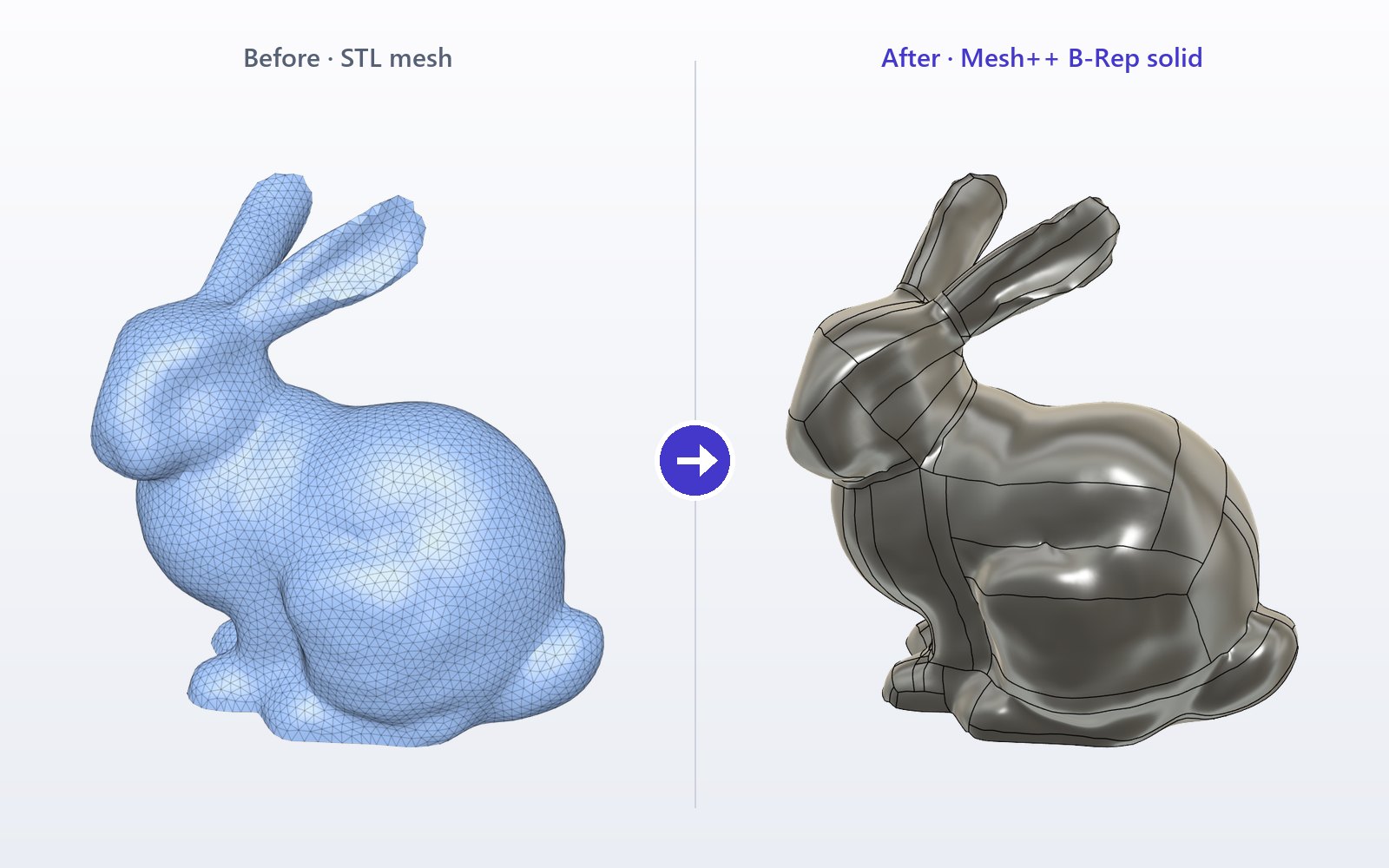
A closed mesh gives a solid, an open one a surface. When a mesh cannot be converted as asked, Mesh++ proposes the next step instead of stopping: a slightly wider tolerance, a repair, or a rebuild of the surface; after an accepted suggestion there is always a result. The sneaker in the 3D viewer of our home page, 20,000 quads, takes about five minutes.
Without an add-in, Fusion’s Convert Mesh with the Organic method gives a smooth body too, with the Fusion Design Extension. You can also model a T-Spline by hand in the Form workspace over the scan, which gives the most control but takes hours for a complex shape.
Step 2b: scanned machine parts, rebuilt as CAD faces
A scanned bracket or housing should come back with flat faces, round bores and aligned axes, not as a smooth blob. In Mesh++, run Mesh to Brep – Mechanical with Mesh Type: Scanned Mesh. The scan is welded, cleaned and simplified to about 120,000 triangles, its noise is measured, and the surfaces the part was designed with are searched for: planes, cylinders, cones, spheres and tori, with parallel planes, coaxial axes and equal radii made exact, plus free-form faces where the part has no simple shape. Fusion checks the body before it is created, and faulty faces are refitted.
On twelve sample scans of mechanical parts (a car rim of 2.5 million triangles, a game controller, an exhaust pipe…), the reconstruction takes about 76 seconds per scan on average, Fusion included. The result is a solid you can cut, drill and fillet; see reverse engineering an STL for the CAD-exported case.
Step 3: check the result against the scan
- Read the deviation reported at the end of the conversion: it is measured between the mesh and the solid, on sampled points.
- Compare Meshes in the Mesh++ Inspect panel colours one mesh by its distance to another, from blue (inside) through green to red (outside): tessellate the solid (Mesh › Create › Tessellate) and compare it with the scan, or compare two scans of the same part.
- Keep the original scan in the design: Mesh++ never modifies the source mesh.
Frequently asked questions
How many quads should I ask for?
Start with the default of 5,000 for an object that fits in a hand, and go up to 20,000 for a detailed sculpt or a large scan. The number is a strict maximum: more quads follow the mesh more closely but make a heavier solid that Fusion takes longer to build.
Will the solid match my scan exactly?
No surface rebuild is exact: it smooths the scan noise and stays within a tolerance (1 mm by default for Organic). Mesh++ measures the largest sampled deviation between the scan and the solid and reports it; on the Stanford Bunny at default settings it is 0.62 mm for a 1 mm request.
My scan has holes. Can it still become a solid?
A solid needs a closed surface. Close the holes first (Mesh > Prepare > Repair in Fusion, or Repair Mesh Before Conversion in Mesh++). An open scan of a thin skin, such as a car body panel, can also be converted on purpose into a surface instead of a solid.
Does Mesh++ send my scan to a server?
No. The conversion runs on your computer, inside Fusion and in the add-in’s own engine. Only the licence key is checked online.
Organic or Mechanical for a scan?
Organic for shapes without planes or exact radii: people, animals, sculptures, ergonomic handles. Mechanical with Mesh Type set to Scanned Mesh for a scanned machine part, so that its flats, bores and axes come out as real planes and cylinders.
Mesh++ for Autodesk Fusion
Meshes, scans and STL files into real solids, inside Fusion. Windows, lifetime licence from 49 €, all updates included.